Choosing among China’s top 10 LED panel suppliers requires more than comparing prices or product photos. A reliable evaluation begins with pixel pitch, cabinet dimensions, brightness, refresh rate, viewing distance, and service support. Indoor conference rooms may need fine-pitch panels, while outdoor stages require weather protection and higher brightness. Supplier certifications, factory testing, spare parts, and warranty terms also deserve careful review.
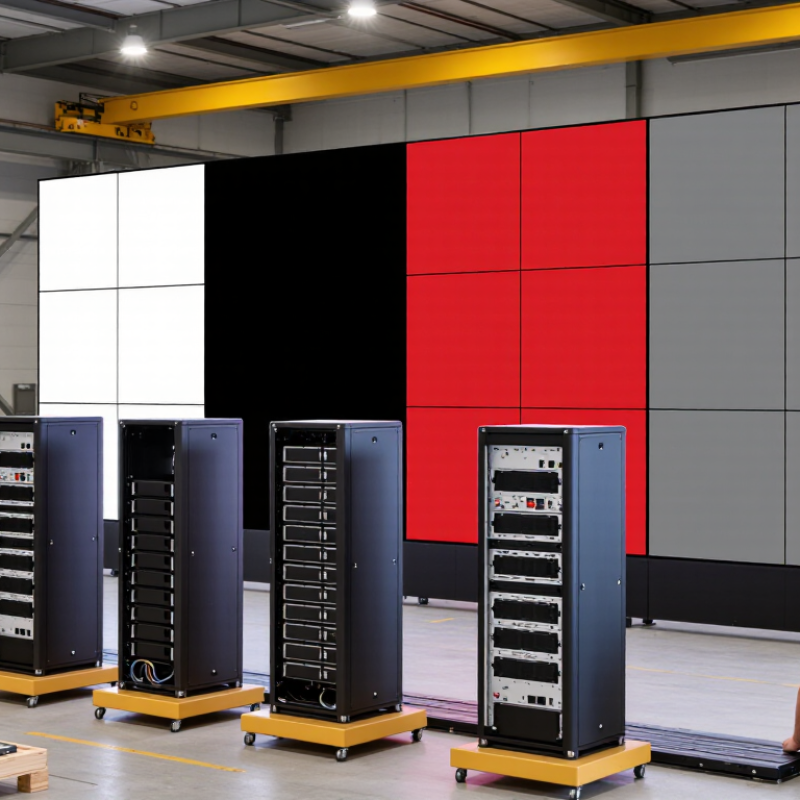
The practical question is how to combine multiple LED panels seamlessly. Correct cabinet alignment is essential. Even a small height difference can create visible lines across a large video wall. Installers should check locking systems, module tolerances, power distribution, and data cable paths before mounting every cabinet. A test image with white, black, red, and gray fields can reveal inconsistent brightness or color temperature. Calibration software helps, but it cannot fully repair poor manufacturing consistency.
Small details matter.
Experienced project teams often assemble several cabinets on the floor first. They measure flatness with a straightedge and confirm signal flow before lifting the structure. The receiving card, sending box, controller, and backup signal path must match the supplier’s system. Mixed batches can create unexpected color differences, even when the model number appears identical. This is an area where many buying guides oversimplify the process.
The leading suppliers may offer strong engineering support, yet no manufacturer removes every installation risk. Buyers should request sample testing, recent project references, factory inspection evidence, and a written acceptance checklist. A careful comparison should include total ownership cost, not only the initial quotation. When planning a curved, corner, or irregular display, professional design support becomes especially valuable for stable, uniform results.
LED panels are flat display modules made from many light-emitting diodes. Each diode produces colored light, forming images, text, or video. Unlike ordinary projectors, they remain bright in rooms with strong ambient light. Their modular design also makes large screens possible.
In practice, LED panels are used in retail windows, conference rooms, stages, transport halls, and outdoor advertising structures. Indoor panels usually have a finer pixel pitch, so viewers can stand close without seeing obvious gaps. Outdoor panels need stronger weather protection and higher brightness. I always check the viewing distance before selecting a panel. A fine pitch is not automatically the best choice.
Combining panels requires compatible cabinets, receiving cards, power supplies, and control software. Installers connect cabinets in rows, then join signal cables in a planned direction. The cabinet edges must align carefully. Even a small height difference can create visible lines across the screen. Power should be distributed safely, with the load checked against the system rating. Ventilation also matters, especially in warm venues.
After assembly, technicians adjust brightness, color, and grayscale performance. A calibration camera can reveal differences that look minor to the eye. I once found uneven brightness caused by a loose data connection, not a defective module. That experience changed my inspection routine. Testing a full-color video is useful, but simple gray images often expose problems faster.
Evaluating China’s top 10 LED panel suppliers requires more than comparing prices or showroom photos. Start with the panel’s pixel pitch, brightness, refresh rate, cabinet weight, and viewing distance. Ask for measured data, not only printed specifications. A reliable supplier should provide production records, quality-control procedures, and test reports from recognized laboratories.
Request samples from several suppliers and inspect them under normal indoor lighting. Check color consistency, cabinet alignment, connector strength, and front or rear maintenance access. Then test a small video wall for at least several hours. Flicker may appear after installation, even when a sample looks perfect. That detail matters. Speak with recent customers about delivery accuracy, technical support, spare modules, and warranty response times.
Supplier evaluation also includes how panels combine in real projects. Confirm cabinet dimensions, locking systems, control-card compatibility, power distribution, and calibration methods. Ask whether mixed batches can maintain consistent color and brightness. Factory visits can reveal assembly discipline, storage conditions, and staff training. Still, a clean factory is not proof of long-term performance. I have seen impressive demonstrations hide weak documentation. Therefore, record every promise in the contract, including tolerances, replacement procedures, delivery dates, and after-sales responsibilities. No checklist is perfect. Your own site conditions may expose limitations that supplier tests never reveal.
This procurement scorecard uses practical evaluation dimensions and suggested buyer weightings rather than company or brand data. When combining LED panels, verify identical pixel pitch, cabinet dimensions, receiving cards, calibration, brightness, refresh rate, power requirements, and module compatibility before installation.
Before combining LED panels, match the electrical and optical specifications, not just the cabinet size. Pixel pitch controls viewing distance and image sharpness. Resolution must remain consistent across every module. A 1.5 mm panel beside a 2.5 mm panel can create visible seams. Refresh rate also matters. For camera-facing installations, 3,840 Hz or higher usually reduces scan lines and flicker.
Check brightness under real lighting conditions. Indoor panels often need around 800–1,500 nits, while outdoor units may require 5,000 nits or more. Excessive brightness can damage comfort and color consistency. The 2024 U.S. Department of Energy Solid-State Lighting report highlights efficacy, color quality, and long-term reliability as key performance factors. LED adoption is already mainstream. The International Energy Agency reported that LED products represented more than half of global lighting sales in 2022.
Power specifications deserve equal attention. Confirm input voltage, peak wattage, average wattage, and circuit capacity. A combined wall may draw unexpected current during startup. Match scan mode, data interface, receiving cards, cabinet dimensions, and calibration files. Small differences matter.
Do not trust one datasheet alone. Testing helps.
In field commissioning, technicians should measure white balance, brightness, temperature, and power at the completed wall. Color temperature should remain stable across panels, especially near skin tones. A neat spreadsheet can still miss heat buildup behind the display. I would also leave a small tolerance for manufacturing variation. Perfect uniformity is promised too easily, and real installations often prove otherwise.
| No. | Specification | Typical Professional Range | Why It Matters When Combining Panels | Recommended Matching Requirement | Verification Method |
|---|---|---|---|---|---|
| 1 | Pixel Pitch | Indoor: approximately 0.9–3.9 mm Outdoor: approximately 3–10 mm |
Pixel pitch determines image sharpness and the suitable viewing distance. Different pitches create visible resolution and scaling differences. | Use the same pixel pitch across all panels in one continuous image area. | Check the module datasheet and measure the center-to-center distance between adjacent pixels. |
| 2 | Cabinet Dimensions | Common formats include 500 × 500 mm and 500 × 1000 mm; custom sizes are also available. | Cabinet dimensions affect the physical layout, total screen ratio, mounting structure, and replacement compatibility. | Match cabinet width, height, mounting points, and connection orientation. | Compare mechanical drawings, connector locations, locking positions, and cabinet tolerances. |
| 3 | LED Module Resolution | Determined by cabinet size and pixel pitch; for example, a 500 mm cabinet at 2.5 mm pitch contains about 200 pixels per side. | A different module resolution can cause image misalignment, irregular scaling, or unusable spare modules. | Use identical pixel dimensions per module or ensure the controller supports the required mapping. | Confirm the number of pixels per module and cabinet in the receiving-card configuration file. |
| 4 | Refresh Rate | Common values: 1,920 Hz, 3,840 Hz, and 7,680 Hz. | A mismatch can produce scan lines, flicker, or inconsistent camera performance, especially in recorded video. | Use panels with the same refresh rate; 3,840 Hz or higher is commonly preferred for broadcast and filming. | Review controller settings and test the assembled display with a camera at different shutter speeds. |
| 5 | Brightness | Indoor: approximately 600–1,500 cd/m² Outdoor: approximately 4,500–10,000 cd/m² |
Different brightness levels create visible blocks or seams and may cause uneven appearance under changing light. | Keep brightness specifications and calibration settings consistent across all panels. | Use a calibrated luminance meter and compare panels after warming them up for stable operation. |
| 6 | Color Temperature and Color Gamut | Typical adjustable white balance: about 3,200–9,000 K; common LED displays support broad video color spaces. | Different LED batches or calibration profiles may produce noticeable color shifts between cabinets. | Use the same LED package type, calibration profile, white-balance setting, and color-processing mode. | Display white, gray, red, green, and blue test images and compare them using a colorimeter when accuracy is critical. |
| 7 | Scan Mode | Common scan configurations include 1/8 scan, 1/16 scan, 1/32 scan, and 1/64 scan. | Scan mode influences brightness, power behavior, driver configuration, and receiving-card compatibility. | Do not combine modules with different scan modes unless the controller and receiving-card configuration explicitly support them. | Check the driver IC configuration, module label, and receiving-card parameter file. |
| 8 | Power Consumption | Typical maximum consumption: approximately 400–1,200 W/m²; average operating consumption is often lower. | Unequal power demand can overload power supplies, create voltage drop, and cause brightness instability. | Calculate total load using the maximum rated power and provide suitable circuit and power-supply capacity. | Use: total power ≈ screen area × maximum W/m². Verify cable size, breaker rating, and voltage drop. |
| 9 | Data and Power Interface | Common systems use standardized power connectors and Ethernet-based data transmission. | Different connector types, pin assignments, data directions, or cable lengths can prevent panels from communicating correctly. | Match connector type, pinout, data direction, cable specification, and maximum transmission distance. | Inspect wiring diagrams and test every cabinet individually before final installation. |
| 10 | Ingress Protection | Indoor products are commonly IP20 or similar; outdoor products often use IP65 on the front side. | Combining cabinets with different environmental protection levels may reduce the protection of the complete display. | For outdoor installations, use cabinets with suitable front and rear protection for the actual weather conditions. | Check the official IP rating, sealing design, drainage path, and installation environment requirements. |
| 11 | Operating Temperature and Humidity | Many professional products operate around −20°C to +50°C; exact limits vary by design. | Different operating limits can lead to premature failure, condensation, or inconsistent performance in the same screen. | Select panels with compatible temperature, humidity, ventilation, and condensation requirements. | Compare datasheet limits and evaluate local climate, ventilation, heating, and cooling conditions. |
| 12 | Controller and Receiving Card Compatibility | Compatibility depends on controller model, receiving-card type, loading capacity, scan configuration, and firmware. | Panels may be physically identical but electrically incompatible because of different mapping or driver settings. | Use one validated configuration file and confirm the controller’s total pixel-loading capacity. | Test the complete chain: video source, sending device, optical or Ethernet link, receiving card, and cabinet. |
| 13 | Flatness and Cabinet Tolerance | Professional rental and fixed-installation cabinets are generally designed for millimeter-level alignment. | Uneven cabinet edges create visible lines, raised corners, and image distortion across the combined surface. | Use cabinets with compatible locking systems and controlled dimensional tolerances. | Measure cabinet diagonals, edge alignment, flatness, and the gap between adjacent cabinets. |
| 14 | Maintenance Access | Front-service, rear-service, and dual-service designs are common. | Mixed maintenance methods can increase downtime and make module or power-supply replacement difficult. | Choose a consistent service method or confirm that the installation structure supports both methods. | Perform a service-access test after installation and verify that spare parts can be removed safely. |
| 15 | Calibration and Spare-Part Compatibility | Calibration may include module-level, cabinet-level, and full-screen brightness and color correction. | Unmatched calibration data or spare modules can create bright spots, dark spots, and color differences. | Maintain the same LED package, driver IC, module wiring, calibration process, and spare-part specification. | Keep calibration files, receiving-card parameters, production records, and a tested spare-module inventory. |
Combining LED panels is a precision task, not simple stacking. According to Grand View Research, the global LED display market continues expanding, increasing demand for reliable installation methods. Before assembly, measure the wall, viewing distance, and power capacity. Confirm every panel has the same pixel pitch, cabinet size, refresh rate, and receiving-card settings. Mixed specifications often create visible seams.
Begin with a clean, level support frame. Place the first cabinet at the lower-left reference point. Use a laser level and leave no forced gaps. Connect neighboring cabinets with locking hardware, then check the surface with a straightedge. A small twist can become obvious across a large screen. Follow the manufacturer’s load limits and use qualified electrical technicians for power distribution.
Connect power cables separately from signal cables. Map each cabinet in the control software according to its physical position. Test one row before completing the full wall. Check dead pixels, color consistency, flicker, and cabinet temperature. The U.S. Department of Energy reports that LED systems can deliver major energy savings compared with traditional lighting, but poor configuration still wastes power. Calibration may require several attempts. That is normal. Recheck brightness at low levels, because factory settings can look harsh indoors. Mordor Intelligence also identifies fine-pitch displays as a growing segment, making accurate alignment even less forgiving. One skipped test can spoil the entire installation.
Combining LED panels requires more than matching cabinet sizes. Before installation, inspect each panel for damaged pixels, loose connectors, and uneven frames. Use a reliable test source to check brightness, grayscale, refresh rate, and color uniformity. Test every cabinet individually. Record the results.
During assembly, keep power and data cables separated where practical. Confirm signal direction before powering the system. A single reversed connection can interrupt several panels. Check cabinet alignment with a straight edge, especially along the top row. Small gaps become obvious on camera.
In practice, the first calibration is rarely perfect. I have seen a display look balanced indoors but appear too bright after sunset. Measure again under real viewing conditions. Allow the panels to cool, then inspect fans, vents, and power terminals. Remove dust carefully. Never ignore flickering or unusual heat.
Expansion should follow the original signal map and power calculation. Add panels in small sections, then test the entire wall at different brightness levels. Keep spare modules, cables, and receiving components available. Matching the same pixel pitch is not enough; firmware settings, calibration data, and cabinet tolerances also matter. Leave service access behind the display. It saves time later. A useful record should include installation dates, test readings, replaced parts, and observed faults. Some assumptions will prove wrong, so revise the maintenance plan after each event. Reliable results come from repeated checks, not a single successful startup.
Match pixel pitch, resolution, refresh rate, cabinet size, scan mode, and receiving-card settings. Small differences matter.
Use a refresh rate around 3,840 Hz or higher for camera-facing installations. This usually reduces scan lines and flicker. Test with the actual cameras, because results can vary.
Indoor panels often need about 800–1,500 nits under normal lighting. Outdoor panels may require 5,000 nits or more. Too much brightness can strain viewers and reduce color consistency.
Confirm input voltage, peak wattage, average wattage, and circuit capacity. Startup current can exceed expectations. Use separate power planning for each display section.
Build a clean, level support frame before placing any cabinets. Start from the lower-left reference point. Use a laser level and locking hardware. Do not force uneven gaps closed.
Test one row before finishing the full wall. Check dead pixels, grayscale, brightness, flicker, temperature, and color uniformity. Test every cabinet individually and record the readings. One skipped test can affect everything.
Check cabinet surfaces with a straightedge, especially across the top row. Map each cabinet according to its physical position. Recheck brightness at low levels, where indoor settings may look harsh. The first calibration is rarely perfect.
Inspect fans, vents, connectors, and power terminals after the panels cool. Remove dust carefully and investigate unusual heat or flickering. Add panels in small sections, following the original signal map. Keep spare cables and modules nearby. Some assumptions will prove wrong.
This article explains what LED panels are, how they function as modular visual displays, and where they are commonly used in indoor and outdoor applications. It presents a practical framework for evaluating China’s top 10 LED panel suppliers, focusing on manufacturing consistency, pixel pitch, brightness, color performance, cabinet design, control compatibility, technical support, delivery capability, and after-sales service. It also highlights the specifications buyers should confirm before planning a combined display, including panel dimensions, resolution, refresh rate, viewing distance, power requirements, and signal interfaces.
The guide then provides a clear process for how to combine multiple LED panels seamlessly. It covers measuring the installation area, selecting matching modules, preparing the mounting structure, aligning cabinets, connecting power and data cables, configuring the controller, and calibrating brightness and color. Finally, it explains how to test the completed display, identify common connection or alignment problems, perform routine maintenance, and expand the system later without compromising image quality or stability.

Aras LED